Welcome! Let's get you set up.

Your child's transportation company uses EasyKids2Go. With the app you can see the vehicle on the map, get a heads-up when the driver is on the way and when they arrive, and let them know when your child isn't going.

Free for parents. Available for iPhone; the Android app is coming soon.

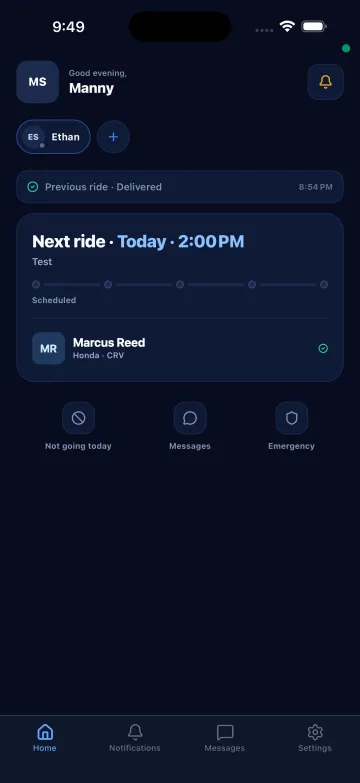
Parent app home: next ride today, driver and vehicle, not going today, messages and emergency
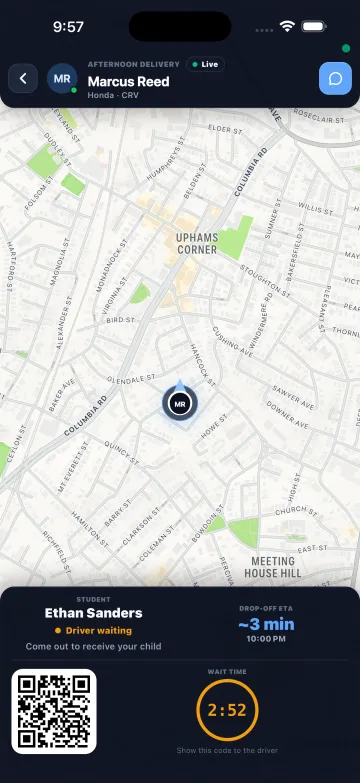
Parent app: the driver is waiting at the door, with a wait timer and the child's QR code
How to join

It starts with an invitation from your transportation company.

They send it by email, and it tells you how to join. Most parents get a student code. Others, like a second parent, get a temporary password instead.

You got a student code

Create your account in the app

  1. Download EasyKids2Go from the App Store and open it.
  2. Tap “Create Account.”
  3. Enter the student code. It has 8 characters, like DO384921.
  4. Add your child's full name and date of birth, just as your transportation company has them.
  5. Enter your email and tap “Send verification code.” Use the same email where you got the invitation. We'll email you a 6-digit code; type it in.
  6. Add your phone number and create a password.
  7. Read the authorization, check the box and sign with your finger.
  8. Tap “Activate Account.” That's it, you're in.
You got a temporary password

Log in with your invitation

  1. Download EasyKids2Go and open it.
  2. Tap “Log In.”
  3. Use the email and temporary password from your invitation.
  4. Create your own password. The temporary one only works the first time.

Already have an account? On the login screen, tap “Forgot Password?” to get back in.

In the app

What you'll see once you're in.

Home: next ride, driver and vehicle, and the Not going today, Messages and Emergency buttons

Your day at a glance

The next ride, your driver and the vehicle, plus buttons for “Not going today,” Messages and Emergency.

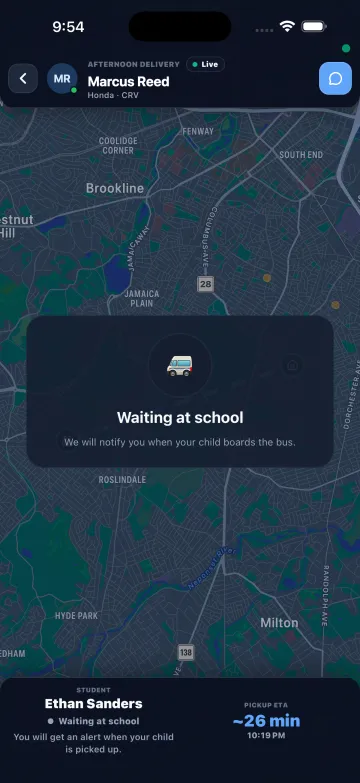
Live map while the child waits at school, with the pickup arrival time

The vehicle on the map

See where the vehicle is and about when it will get there. You'll get a notice when your child is picked up and dropped off.

The driver is waiting at the door: wait timer and the child's QR code

When the driver arrives

You get a notice, a wait timer and your child's QR code for the handoff. Tap “I'm coming out” so the driver knows.

  • Child not going? Tap “Not going today” and the driver knows before leaving.
  • More than one child? On the Home screen, tap + and enter the other student code.
  • English or Spanish. The app works in both.

Real screens from our parent app on the App Store.

Questions

Questions parents ask.

About the route or schedule

Pickup times, days off and anything about your child's route are handled by your transportation company. Reach out to them directly.